Player guide
One window, one button. Your mods match the server's before Valheim starts, and nothing you put in that folder yourself is ever deleted.
This is an early version. ValhSync 0.0.3 has been used by one group of players on one server. It works there, and the launcher never deletes anything you put in your own BepInEx folder — what it does not recognise is moved aside, not thrown away. But you are among the first people to run it, so expect rough edges, and tell your server admin when you hit one.
§1Install
Nothing to install, nothing to open on your router, no administrator rights. ValhSync only makes outgoing connections, like a browser, and only writes inside the Valheim folder.
Put valhsync.exe wherever you like — the Desktop is fine. If your admin sent a
zip, keep valhsync-invite.txt next to the executable: the launcher reads it on
first start and you have nothing to type.
Windows will warn you, and here is why
ValhSync is not signed with a paid certificate, so Windows shows “Windows protected your PC” the first time. More info, then Run anyway.
That warning does not mean the file is dangerous. It means Windows has not been told who published it. What tells you the file is the one your admin meant to send is its fingerprint — ask them for it, then check yours:
Get-FileHash valhsync.exe -Algorithm SHA256The two must match character for character. If they do not, do not run it, and tell your admin.
§2Add your server
Click Add a server and paste the server's address. That is the normal way, and the one almost everybody uses.
The address — the usual way
Something like 203.0.113.10:2456: exactly what you already paste into
Valheim's own join box. Nothing else to ask your admin for.
The launcher fetches the server's key and shows you its fingerprint before pinning anything. Compare it with the one your admin announced, then accept.
An invite code — if you were sent one
A long line starting with valhsync1:, pasted in the same box. The code
carries the server's key inside it, so there is no fingerprint to compare. Some admins
ship it as valhsync-invite.txt beside the executable, and then you type
nothing at all.
You can add several servers and switch between them from the list at the top.
§3Playing
Press PLAY. That is the whole of it.
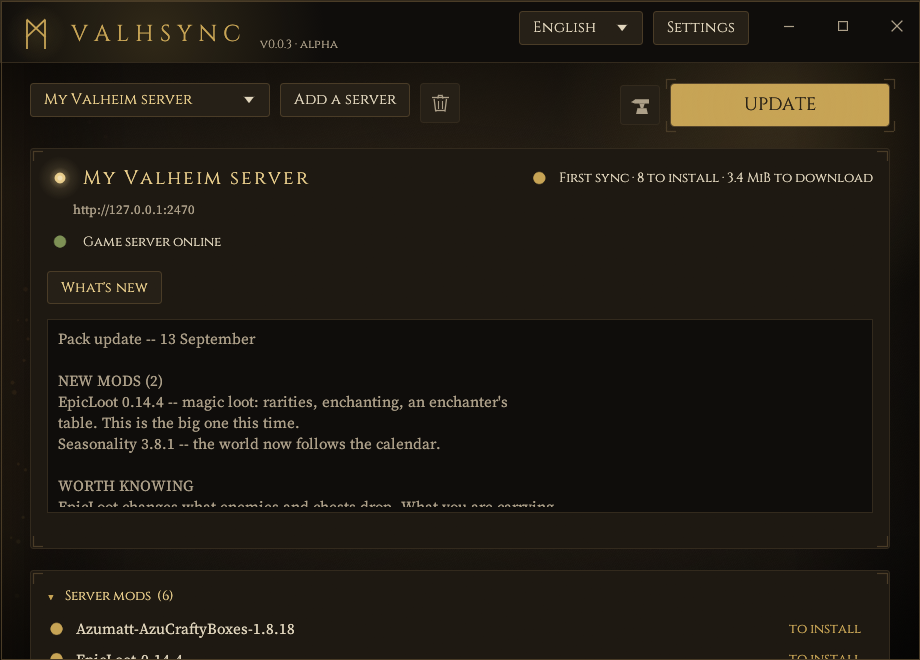
One press does it. If the admin changed something the launcher downloads only what changed and then starts Valheim through Steam; if nothing changed it just starts the game and connects you. There is no screen asking you to agree to anything: you said who you trust when you added the server, and the launcher does not ask twice.
Close Valheim before syncing. The launcher refuses to change files while the game is running, rather than doing it behind the game's back.
Your own edits to config files — keybinds, UI positions — survive a sync. The server seeds configs but does not overwrite them, unless your admin deliberately enforces a particular file.
§4What's new
The What's new button lights up when your admin has written something. It holds what they wrote — the part no list can tell you: that a mod resets its own configuration, that you should empty a chest before this one, that the update only matters if you were crashing on the boat — along with the mods added, updated and removed by name, computed from the pack itself so it is always right and always complete.
It is a button and not a panel in your way on purpose. You came here to press one thing, and a wall of text in front of it stops being read by the third time it appears. It is one click away instead, and it stays there after the sync, which is more than a warning shown only at the moment of installing ever manages.
It holds what your server is publishing now, and nothing older. There is no archive of every message it has ever sent: that is a list nobody opens twice, and the note that matters is the one describing the pack you are about to be on.
§5The other buttons
- Go back to the previous version — undoes the last sync exactly, from the backup taken before it. For when a mod update breaks something and you would rather play elsewhere while your admin sorts it out.
- Open the set-aside folder — where mod files ValhSync did not recognise
were moved (
BepInEx/_valhsync_quarantine/inside the game folder). Moved, never deleted. Yours to put back. - Play without mods — disables BepInEx by renaming one file and starts the vanilla game. Nothing is uninstalled; the next PLAY puts it back.
- Repair — re-checks every file against the server and re-fetches anything that no longer matches.
- Settings — set the game folder by hand if Steam detection fails (the
folder holding
valheim.exe), forget a server, or start over: Reset everything forgets every server and every ValhSync setting, and touches neither the game nor the mods already installed. - The language menu, top right: English, Français, Deutsch, Español, Italiano, Polski, Português, Русский. Your choice is remembered. Everything but English and French was translated without a native speaker to check it — if something reads wrong in yours, say so and it will be fixed.
§6If your antivirus removes it
ValhSync is not signed with a paid code-signing certificate, and every build is a file
Windows Defender has never seen anywhere else. That, plus what the launcher legitimately does —
download files from a server, write them into the game folder, replace its own executable when
a server offers a newer one — occasionally trips the machine-learning classifier, which reports
something like Trojan:Win32/Bearfoos.A!ml.
The !ml suffix is the giveaway: a guess from a model, not a match against a
known threat.
A code-signing certificate is what makes both warnings go away, and one has been applied for. Until it exists, the SHA-256 above is the check that actually proves something.
§7A newer ValhSync
A server can offer a newer launcher. If yours does, a band in the theme's northern blue appears above the server card with the version, the server's name and its key fingerprint. One click downloads it, checks it against the digest the server signed, replaces your launcher and restarts it.
Worth knowing what you are agreeing to. The file comes from that server's admin, not from this project. The signature proves it came from the server you already trust for mods; it does not prove anything about what the file is, and unlike a mod it runs whether or not you start Valheim. Trusting an admin with your mod folder and trusting them with a program are not quite the same decision.
You never have to take it. Declining changes nothing — syncing and playing carry on — and releases can always be downloaded from the project itself.
§8Linux and Steam Deck
BepInEx only loads if Valheim's launch options are set in Steam (Valheim → Properties → Launch options):
Proton:              WINEDLLOVERRIDES="winhttp=n,b" %command%
Native Linux build:  ./start_game_bepinex.sh %command%
The launcher shows the right line for your install.
§9Command line
The same executable works in a terminal:
valhsync join <ip:port>   add a server (an invite code works too)
valhsync status           show what a sync would do
valhsync sync             sync without starting the game
valhsync play             sync and start the game
valhsync rollback         undo the last sync
valhsync vanilla on|off   toggle BepInEx
valhsync doctor show what ValhSync found on this machine§10When it goes wrong
| What you see | What to do |
|---|---|
| Server offline | Your admin's publisher is not running, or the port is closed. The launcher keeps trying on its own; tell your admin if it lasts. |
| The server's key does not match | The key changed. Do not accept a new code from anywhere but your admin, directly — then add the server again. |
| Valheim is running | Close the game first. |
| Valheim was not found | Set the folder in Settings: the one holding valheim.exe. |
Where it keeps its things
| Windows | Linux | |
|---|---|---|
| Servers, settings, what is installed | %APPDATA%\valhsync | ~/.config/valhsync |
| Backups | %LOCALAPPDATA%\valhsync\backups | ~/.local/share/valhsync/backups |
Deleting those resets the launcher without touching your game. It is also why replacing the launcher with a newer one keeps your servers.
Keeping everything beside the launcher
For a shared computer, a USB stick, or just to see what a newcomer sees: create a folder
named valhsync-data next to valhsync.exe and
everything lives there instead. It is used only if you made it, so nothing changes for anyone
who does not. valhsync doctor says which of the two is in use.